" height="15.65460401053985px" id="E2hITFMIY" width="89px"/><path d="M 15.154 0 L 6.296 0 C 5.965 0 5.657 0.167 5.473 0.446 C 5.289 0.725 5.255 1.078 5.38 1.389 C 5.43 1.511 5.504 1.621 5.598 1.714 C 5.783 1.903 6.034 2.01 6.296 2.01 L 13.158 2.01 C 12.949 3.493 12.28 4.868 11.247 5.936 L 11.198 5.987 L 11.149 6.037 C 10.099 7.086 8.747 7.765 7.29 7.977 C 5.94 8.177 4.562 7.968 3.329 7.374 C 2.634 7.038 1.998 6.588 1.447 6.041 L 1.398 5.99 L 0 7.414 C 0.221 7.641 0.455 7.854 0.699 8.054 C 0.908 8.224 1.126 8.39 1.351 8.542 C 1.967 8.962 2.632 9.301 3.332 9.552 C 3.972 9.784 4.637 9.938 5.312 10.013 C 5.971 10.089 6.635 10.089 7.293 10.013 C 8.711 9.856 10.07 9.353 11.254 8.545 C 11.739 8.214 12.192 7.837 12.605 7.417 C 12.829 7.192 13.039 6.954 13.235 6.703 C 13.405 6.492 13.563 6.272 13.711 6.044 C 14.506 4.84 15.001 3.458 15.155 2.016 C 15.192 1.682 15.21 1.346 15.21 1.01 C 15.209 0.673 15.19 0.335 15.155 0 Z" fill="rgb(8, 46, 57)" height="10.070297475553705px" id="SUqhhb7Az" transform="translate(2.507 7.93)" width="15.210335938094289px"/></g></g></svg>)
Best practices
Sharing shipment evidence with customers: reports, links and portals compared
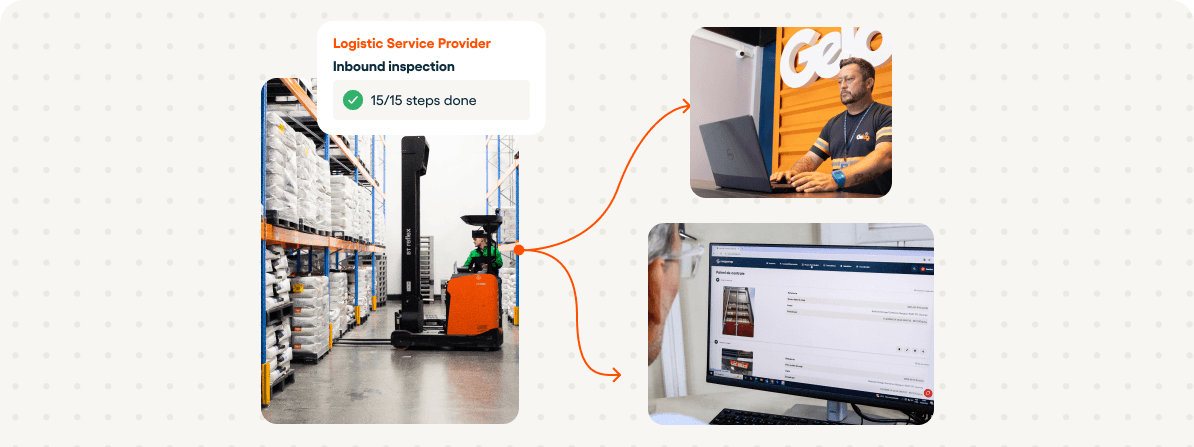
Most logistics teams share shipment evidence by email: a few photos, a PDF, sometimes a forwarded WhatsApp message. That works until a customer asks for the full picture of one load. This guide compares the five ways LSPs and shippers share handling evidence with their customers, what each one costs in time and which tools fit which job.
Cargosnap is inspection management software for warehouse teams at LSPs and shippers. The Cargosnap App captures the evidence on the warehouse floor. The Cargosnap Web-App shares it with customers as a branded report, a link or a customer portal.
What shipment evidence means in a warehouse
Shipment evidence is the record of what happened to a load while you were responsible for it. For a carrier, that is mostly proof of delivery: a signature and a photo at the door. For a warehouse, it covers every handling moment between arrival and dispatch.
A complete warehouse record usually holds:
Condition at arrival. The truck or container, the seal and the load as it was when the doors opened.
Receiving. Pallet counts, labels, reference numbers and any damage found.
Storage and internal moves. Repacking, re-wrapping, relabeling and other value-added services.
Loading. The empty trailer, how the load is stacked and secured, the closed doors and the seal number.
Deviations. Damage, shortages, wrong labels or temperature issues, with close-ups and who reported them.
Documents and signatures. CMR, delivery notes and the signatures of drivers and receivers.
Every item carries a time, a location and a reference, such as the shipment, container, order or CMR number. That reference is what lets a customer, insurer or auditor find the proof for one specific load. It is also what keeps the chain intact when goods change hands between parties.
Proof of delivery and proof of handling are different
Search for shipment evidence tools and most results are proof of delivery apps for drivers and couriers. They close the last mile. They don’t show how goods were received, stored or loaded in a warehouse. That is where many disputes between shippers, LSPs and carriers start, because damage is often found at receiving or at the customer, days after the goods left the dock. It is also why so many cargo damage claims get denied: the evidence for the handling part is missing.
Aspect | Proof of delivery | Proof of handling |
|---|---|---|
Where | At the delivery address | On the warehouse floor and at the dock |
Who captures it | Drivers and couriers | Warehouse and dock teams |
What it shows | The goods arrived and someone signed | How the goods arrived, were handled and left |
Typical tools | Proof of delivery (ePOD) apps | Warehouse inspection software such as Cargosnap |
Protects against | “It never arrived” | “It was damaged in your warehouse” |
Who asks for the evidence, and when
Shippers and cargo owners want to see the condition of their goods at receiving and before dispatch, often the same day.
Consignees want proof that the load left complete and undamaged.
Carriers need proof when damage is found at unloading, before the driver leaves.
Insurers ask for photos, times and references when a claim is filed, often weeks later. Read what insurers accept as proof of damage.
Auditors want proof that every check was done, for OEA, CTPAT, ISO or a customer audit. See compliance in Cargosnap.
Timing matters. Evidence shared before the truck leaves the dock can settle a question on the spot. Evidence found three weeks later in a group chat rarely settles anything.
Five ways to share evidence with customers
Email attachments. The office collects photos from phones and attaches them to an email. Fast for one photo. Slow for a full load, limited by attachment size and hard to trace later.
Shared folders and chat. A folder in SharePoint, Google Drive or Dropbox, or a WhatsApp group with the customer. Easy to start. But photos are not linked to a shipment, nothing shows if the check was complete and access is hard to control. More on moving shipment photos out of WhatsApp.
Branded PDF report. One document per inspection with your logo: the reference, times, checks, photos and signatures. Customers can forward it to their own team or insurer. Best for a clear record of one load.
Report link. The same evidence as a link instead of an attachment. No file size limits, photos stay in full quality and the customer opens it without an account.
Customer portal. Customers see the files for their own loads whenever they want, without asking. Best for customers with many loads a week or a strict SLA.
Method | Work for the office | What the customer does | Audit trail | Branding |
|---|---|---|---|---|
Email attachments | Manual, per load | Opens attachments | Weak | None |
Shared folder or chat | Fast to start | Searches through files | Weak | None |
Branded PDF report | One click from the file | Opens one document | Strong | Your logo |
Report link | One click, or automatic | Opens a link, no account | Strong | Your logo |
Customer portal | Set up once | Checks their loads anytime | Strong | Your logo |
What a good evidence report contains
The shipment, container, order or CMR reference
The date, time and location of each step
The checks that were done, in order, for example from a standard inspection checklist
Photos per step at full quality, with close-ups of any damage
Counts and seal numbers
Deviations with the type, the number of units and who reported them
Signatures of the driver or receiver
For layout tips, see how to create audit-ready inspection reports with images and visual reporting tips for warehouse managers.
Which tools fit which job
The tools that come up for sharing shipment evidence fall into four groups. They solve different problems.
Proof of delivery apps such as Track-POD, Onfleet and Detrack. For drivers and couriers at the delivery address.
Tracking and visibility platforms such as project44, Shippeo and FourKites. They show where a shipment is and when it arrives.
Form builders and general inspection apps such as GoCanvas, SafetyCulture and Jotform. Flexible forms for any industry, set up by you.
Warehouse inspection software such as Cargosnap. Built for the warehouse floor of LSPs and shippers, with scanning of logistics references, required steps and customer sharing in one tool.
Many logistics companies use more than one. A proof of delivery app closes the delivery. Cargosnap documents everything that happened in the warehouse before it.
How Cargosnap shares evidence with customers
Cargosnap is inspection management software for LSPs and shippers. It is one tool for the warehouse floor and the office. On the floor, the team uses the Cargosnap App on iOS or Android. They scan the shipment, container or CMR number, follow the required steps and take photos and videos at the full quality their device can capture. Each photo gets a time and location and lands in the file for that reference.
In the office, the Cargosnap Web-App holds one file per shipment, load or inspection. Every upload in a file is shared by default. Photos that are blurry or for internal use only are left out with one toggle, or per type for every share (exclude uploads from shares). From the file, there are three ways to share.
By email or link, straight from the file

Enter an email address and the file is shared. The customer gets an email with a link and sees every photo and video in the original quality. The subject line can be set per team, for example with your company name, the type of inspection or the location (set the subject line).
For customers you share with every day, create a contact list per customer, with their email addresses and the language of the emails. Then files can go out automatically, with no one in the office sending them:
As a step in the workflow. The operator picks the customer from a list or scans the customer ID on the dock, for example the customer reference from your WMS (share from your workflow).
When the workflow is done. Every file from a customer-specific workflow goes to the same contact list the moment the inspection is finished (share files automatically).
For a whole team. Every new file from a team is shared with one customer. Useful when a team works only for that customer, for example in subcontracted logistics or 4PL work (share everything from a team).
This is how a customer gets the unloading evidence before the truck has left the dock.
As a branded PDF report

Click Create report in an open file, or select up to 10 files in the file overview and create one report for all of them (generate a PDF report). Upload your logo once and every report and shared file shows your logo instead of ours (add your own logo). Reports stay in the report overview for 30 days, ready to download and forward.
Use a PDF when the evidence has to travel further: to an insurer, a carrier, an auditor or the customer’s claims team.
Through the Customer Portal

Customers who receive files often can open a free Customer Portal account (create a customer portal). Every new share lands there automatically. They search by reference, date and sending company, filter inside a file, for example to show only forms, and see photos and videos in full quality. Nothing fills up their inbox, so they can switch off the email notifications.
The portal belongs to the customer, and you decide what you share. If they work with several companies that use Cargosnap, all shares sit in one place. On the Sharing page you see every incoming and outgoing share, and admins decide who in the receiving company sees them (overview of shared files). Read more about the customer portal.
Deviations found during handling go into Issue Management, where the team logs, assigns and closes them. Customers see the same facts the warehouse sees.
Where teams use it
Inbound: share the condition at receiving the same day, using an inbound truck checklist.
Container stripping: show the seal, the doors and each pallet as it came out.
Cross-docking: prove the load left as it arrived.
Value-added services: show repacking and relabeling per order.
Outbound loading: share the loaded trailer and the seal before the truck leaves, using an outbound container checklist.
Claims: send the full file to the customer or insurer in one click. See how Cargosnap helps you win claims.
See how the Web-App works for the office, or how the Cargosnap App works on the warehouse floor.
All sharing options in one place: sharing in Cargosnap.
Keep reading
