" height="15.65460401053985px" id="E2hITFMIY" width="89px"/><path d="M 15.154 0 L 6.296 0 C 5.965 0 5.657 0.167 5.473 0.446 C 5.289 0.725 5.255 1.078 5.38 1.389 C 5.43 1.511 5.504 1.621 5.598 1.714 C 5.783 1.903 6.034 2.01 6.296 2.01 L 13.158 2.01 C 12.949 3.493 12.28 4.868 11.247 5.936 L 11.198 5.987 L 11.149 6.037 C 10.099 7.086 8.747 7.765 7.29 7.977 C 5.94 8.177 4.562 7.968 3.329 7.374 C 2.634 7.038 1.998 6.588 1.447 6.041 L 1.398 5.99 L 0 7.414 C 0.221 7.641 0.455 7.854 0.699 8.054 C 0.908 8.224 1.126 8.39 1.351 8.542 C 1.967 8.962 2.632 9.301 3.332 9.552 C 3.972 9.784 4.637 9.938 5.312 10.013 C 5.971 10.089 6.635 10.089 7.293 10.013 C 8.711 9.856 10.07 9.353 11.254 8.545 C 11.739 8.214 12.192 7.837 12.605 7.417 C 12.829 7.192 13.039 6.954 13.235 6.703 C 13.405 6.492 13.563 6.272 13.711 6.044 C 14.506 4.84 15.001 3.458 15.155 2.016 C 15.192 1.682 15.21 1.346 15.21 1.01 C 15.209 0.673 15.19 0.335 15.155 0 Z" fill="rgb(8, 46, 57)" height="10.070297475553705px" id="SUqhhb7Az" transform="translate(2.507 7.93)" width="15.210335938094289px"/></g></g></svg>)
Inbound inspections
Mobile apps for incoming goods inspection: what to look for

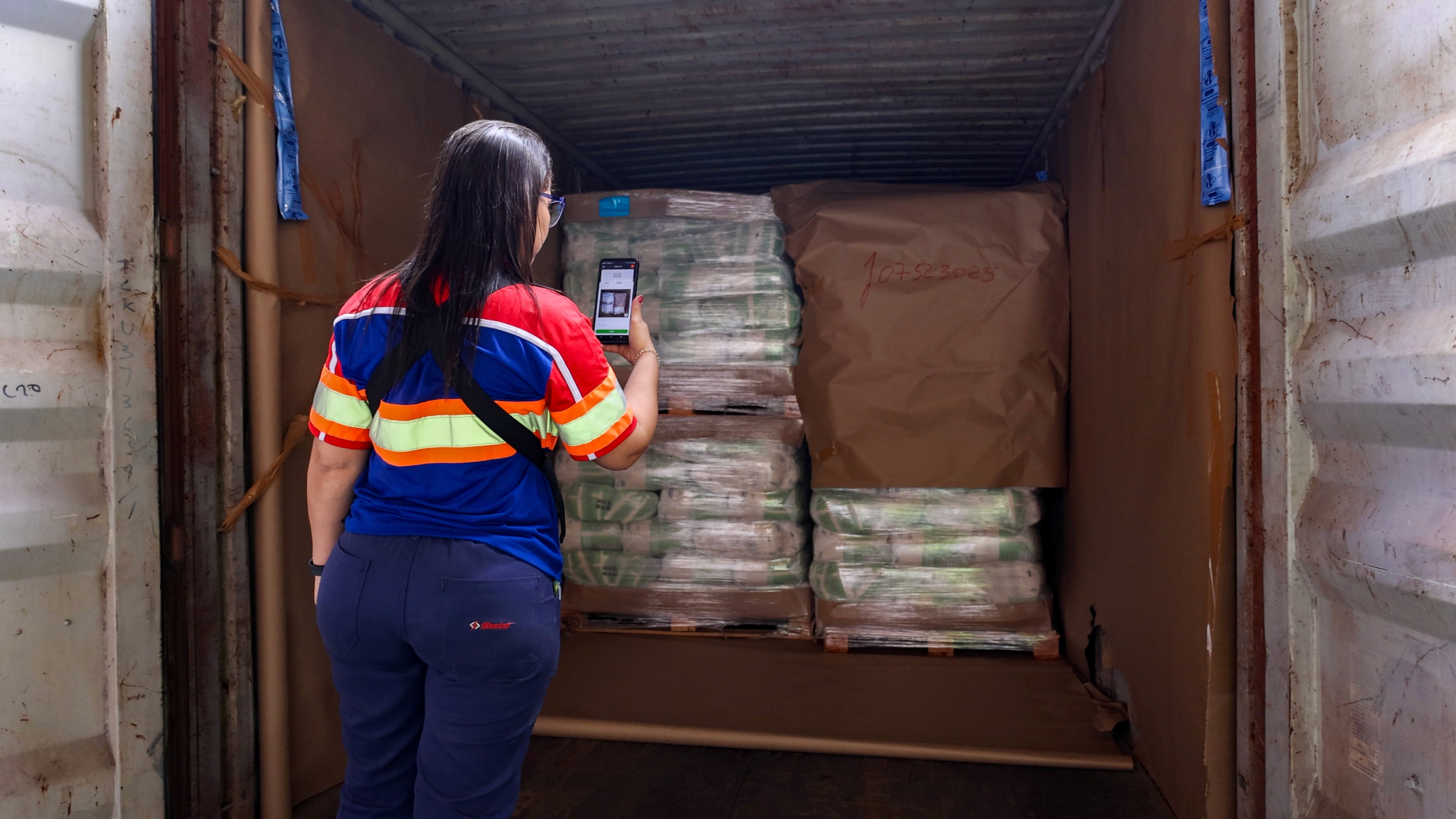
A good mobile app for incoming goods inspection lets whoever is at the dock — receiving clerk, warehouse operator, driver — check a delivery against the purchase order, photograph any damage or discrepancy, and log the result in seconds, without walking back to a desktop or filling out a paper form first. The features that actually matter are barcode or reference scanning, photo and video capture tied to the shipment, structured checklists instead of free text, real-time sync so the office sees the result immediately, and integration with your WMS or ERP so the inspection updates the record automatically instead of someone re-typing it later.
Why mobile matters at the dock
Incoming inspection happens in one place: the dock, the moment a delivery arrives. Whoever receives it needs to check quantity against the purchase order, look for visible damage, and decide, right there, whether to accept, flag, or reject the shipment. That decision doesn't wait well.
A desktop-only process forces a choice between two bad options: hold the truck and the driver while someone walks to a terminal to log the check, or wave the delivery through and record the details "later," which in practice means from memory, after the fact, once the discrepancy is harder to prove and the driver is long gone.
A mobile app removes that trade-off. The person receiving the goods inspects the goods where they actually are, with the delivery still in front of them and the driver still on-site if a discrepancy needs to be raised immediately. That's not a convenience feature. It's the difference between catching a shortage or damage claim at the one moment you can still do something about it, and discovering it days later when the pallet is already stored, and the driver's signature is the only record you have.
Must-have mobile features
Not every "inspection app" is built for receiving. Here's what actually separates a purpose-built incoming-inspection tool from a generic form builder:
Barcode, QR, and reference scanning. Scanning a PO number, container reference, or SKU barcode is faster and far more accurate than typing it, and it's what links the inspection to the right record automatically instead of relying on someone matching it up manually.
Photo and video capture tied to the inspection. Not a generic camera roll — photos and video need to be attached directly to the specific delivery, PO line, or pallet they document, with a timestamp, so there's no ambiguity later about what the photo shows.
Structured checklists, not free text. A consistent, tap-through checklist (quantity received, condition, packaging intact, temperature if relevant) means every receiving clerk runs the same inspection the same way. A text box for notes doesn't scale across a team or multiple shifts.
Quantity and discrepancy flagging. The app should make it just as fast to log "received 8 of 10, 2 damaged" as it is to log a clean delivery. If flagging a problem takes longer than accepting it silently, problems stop getting flagged.
Real-time sync. The inspection should be visible to the office, procurement, or the supplier the moment it's completed, not after someone connects to Wi-Fi and manually uploads a batch at the end of the shift.
Offline capture. Docks and yards don't always have a reliable signal. A mobile app that queues photos and data locally and syncs once connected avoids losing an inspection because of a dead zone.
Role-based access. Receiving staff need a fast, simple capture flow; supervisors and procurement need to see the results and act on flagged issues. The same app should serve both without either group wading through the other's interface.
How automation reduces manual entry
The biggest hidden cost of paper-based or ad hoc digital receiving isn't the inspection itself. It's everything that happens after: someone re-keying quantities into the WMS or ERP, re-typing PO numbers by hand, matching photos to the right delivery after the fact, and chasing down a receiving clerk to ask what "damaged, see photo" actually meant.
A mobile app that scans references instead of requiring manual entry removes the most common source of that error at the source: a scanned barcode can't be mistyped the way a hand-written PO number can. Structured checklists remove the second source: a required field that has to be filled in before an inspection can be marked complete means nothing gets skipped, and nothing needs to be chased down later because it was left blank.
The combined effect compounds. Fewer manual re-entries means fewer transcription errors reaching the WMS or ERP. Fewer transcription errors means fewer downstream disputes with suppliers about what was actually received. And because the data structure is consistent across every inspection, it becomes possible to actually analyze it later: which suppliers have the highest damage or shortage rate, which SKUs are most often received incorrectly, which dock or shift has the most discrepancies. None of that is possible when the underlying records are a mix of handwriting, memory, and loose photos.
How Cargosnap's mobile app handles incoming inspections
Cargosnap's mobile app is built around the receiving moment specifically. A reference (a container number, PO, or barcode) is scanned at the start of the inspection, automatically tying every photo, video, and checklist step that follows to the correct shipment. From there, the app walks the operator through a structured inbound checklist rather than a blank form, so every delivery is checked the same way regardless of who's working that shift.
Photos and videos are captured directly inside the inspection step they document, timestamped, and synced into a single digital file the moment the inspection is completed — visible to the operations team immediately, not at the end of the day. Because Cargosnap is built to complement your existing WMS, ERP, or TMS rather than replace it, the data captured on the dock feeds back into the systems your team already uses, instead of living in a separate app no one checks.
Frequently asked questions
Do I need a separate app for incoming inspection if we already have a WMS?
Not necessarily a separate system, but you likely need a mobile capture layer. Most WMS platforms track what should happen at receiving; they're not built to capture photo evidence and structured inspection data from a phone at the dock. A mobile inspection app fills that gap and feeds the result back into your WMS.
Can a mobile inspection app work without a signal at the dock?
A well-built one should. Look specifically for offline capture that queues photos, video, and checklist data locally and syncs automatically once the device reconnects, so a dead zone at the dock doesn't mean a lost inspection.
How is scanning a reference different from just taking a photo of the label?
Scanning a barcode or QR code reads the data directly and links the inspection to the correct record automatically. A photo of a label still requires someone to read and match it manually later, which reintroduces the transcription errors scanning is meant to eliminate.
What's the fastest way to see if a mobile incoming-inspection app fits our process?
Run it on one real receiving process with your own team before rolling it out. Cargosnap's onboarding is built around exactly that: digitizing one real workflow together, testing it as a free trial, then expanding.